
Table of Contents
Let’s face it: the days of updating screens with a USB stick are long gone. And thank goodness. The cloud-based digital signage rules today.
In 2026, if your business isn’t using the cloud to manage its screens, you’re wasting time, money, and a massive opportunity. Digital signage has exploded from simple slideshows to dynamic, interactive experiences that drive sales, engage employees, and build brands.
The engine behind this revolution? Cloud-based digital signage software.
This software lets you control one screen—or one thousand—from a single web browser, anywhere in the world. But with so many options, how do you choose?
We’ve been in this industry for years, and we’ve tested just about every platform on the market. We’re here to break down the absolute best cloud-based digital signage solutions for 2026, comparing them on what actually matters: ease of use, features, reliability, and value.
What Makes a Great Cloud Signage Solution in 2026?
Before we jump into the list, let’s set the ground rules. The “best” solution isn’t just about having the most features. It’s about having the right features that work flawlessly.
Here’s our expert criteria for this 2026 ranking:
- Ease of Use (The “No-Manual” Test): Can a new marketing intern log in and have content playing in under 10 minutes without a 3-hour training session? If the interface is a cluttered mess, it’s out.
- Powerful Content Creation: Does it just play content, or does it help you create it? We’re looking for beautiful templates, smart scheduling, and seamless app integration (like social media, dashboards, and weather).
- Rock-Solid Reliability: Does the screen go black if the internet flickers? A great cloud solution has robust offline playback and monitors its own health, so you’re not driving to a location to “turn it off and on again.”
- Hardware Flexibility: Does it lock you into expensive, proprietary hardware? The best solutions are software-first, letting you use affordable, powerful, off-the-shelf players like an Apple TV, Fire TV Stick, or a simple System-on-a-Chip (SoC) screen.
- Scalability & Security: It needs to be simple enough for one coffee shop but powerful and secure enough for a 500-office enterprise.
With that framework, let’s dive into the top 7.
The 7 Best Cloud-Based Digital Signage Solutions for 2026
1. Kitcast
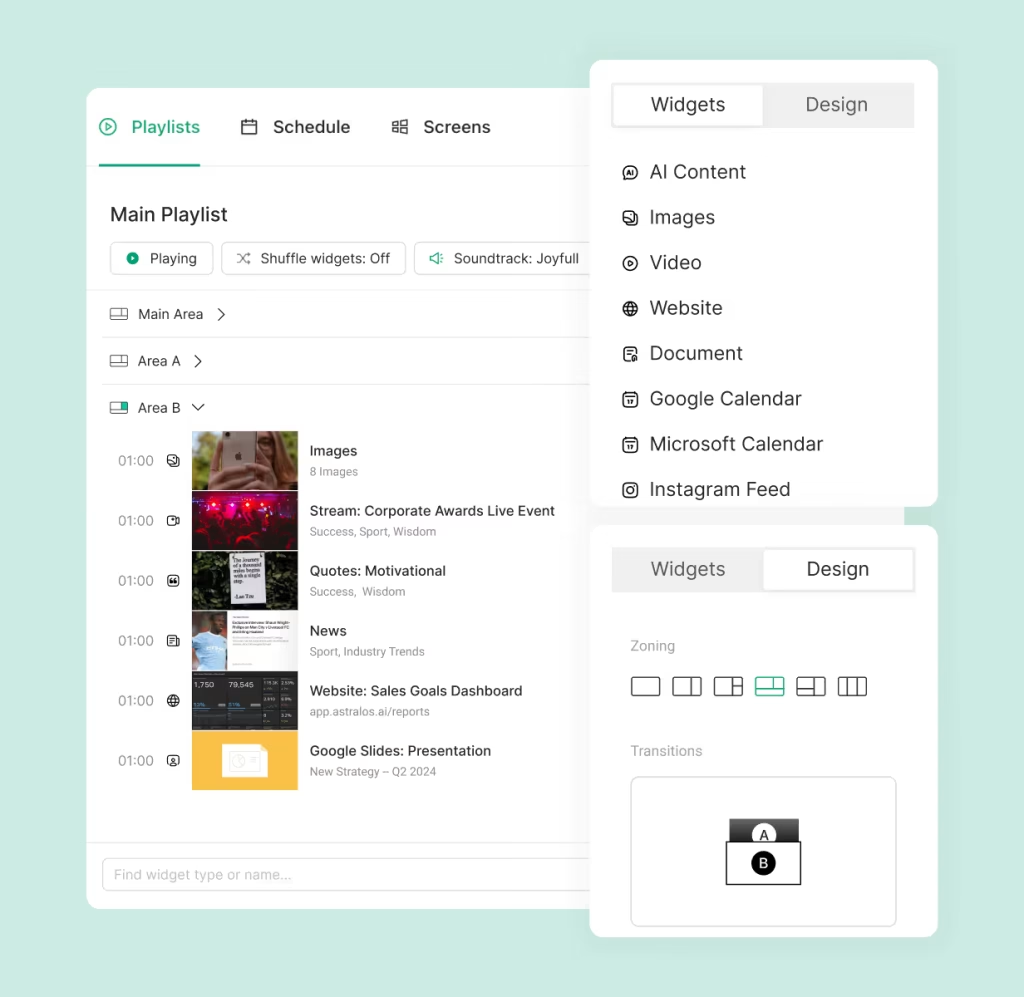
Okay, we’re biased, but we’re also proud. We built Kitcast to be the solution we always wanted: incredibly powerful, yet beautifully simple.
Kitcast takes a curated approach to hardware, focusing on the most powerful, reliable, and widely available consumer devices on the market. It now runs flawlessly on Apple TV, Amazon Fire TV Stick, and Android TV.
Instead of trying to support dozens of slow, obscure, and insecure “pro” players, we focus on the best-in-class hardware you can buy from Apple, Amazon, and Google. This focus guarantees a level of performance, smoothness, and security that “jack-of-all-trades” platforms struggle to match. The hardware is affordable, globally available, and backed by the world’s top tech companies.
Our philosophy is that you shouldn’t need to be a graphic designer to have beautiful signage. Our dashboard is clean, intuitive, and packed with professionally designed templates, automated social media feeds (Instagram, Twitter), and smart apps for things like menus, directories, and corporate announcements.
- Pros:
- Unmatched Simplicity: The user interface is consistently ranked as the most intuitive in the industry.
- Design-First: A massive library of gorgeous, customizable templates.
- Superior Performance: Leveraging powerful hardware like the Apple TV 4K, Fire TV Stick 4K, and modern Android TV devices means zero lag, instant content updates, and flawless 4K video.
- Hardware Flexibility: Supports the best, most affordable hardware from Apple (Apple TV), Amazon (Fire TV Stick), and Google (Android TV).
- Excellent Integrations: Native apps for Canva, Instagram, Google Slides, Microsoft 365, and more.
- Best For: Any business that values design, reliability, and ease of use. From tech startups and modern retailers to corporate offices and universities.
- Get Started: Learn more or start your free trial.
2. Yodeck
Yodeck is a popular, budget-friendly option that gets a lot of attention for its “free screen” offer (if you commit to an annual plan). Its core strength is its support for the Raspberry Pi, making the hardware cost extremely low.
The platform is straightforward and covers all the basics: playlists, scheduling, and a decent range of free widgets. It’s a workhorse. However, the user interface can feel a bit dated and less intuitive than more modern platforms, and the Raspberry Pi, while clever, doesn’t offer the raw power of an Apple TV or Fire TV Stick 4K for demanding content.
- Pros:
- Very affordable, especially with the free Raspberry Pi player on annual plans.
- Solid, reliable playback of all basic media types.
- Cons:
- UI feels technical and less design-focused.
- Relies on lower-powered hardware, which can limit performance.
- Best For: Budget-conscious users and hobbyists who need simple, reliable playback.
3. ScreenCloud
ScreenCloud is one of the biggest names in the game, and for good reason. Their main selling point is a massive “App Store” with over 80 apps. If you want to integrate with a specific, niche tool (like Slack, Trello, or Salesforce), there’s a good chance ScreenCloud has an app for it.
This is also its main challenge. The experience can feel a bit disjointed, with content living in “Apps” vs. “Media” vs. “Playlists.” The new “Studio” interface is an improvement, but it can still be overwhelming for new users. It’s powerful, but that power comes with a steeper learning curve.
- Pros:
- A huge library of third-party app integrations.
- Broad hardware support (Amazon Fire TV, Android, ChromeOS).
- Cons:
- The interface can be complex and overwhelming.
- Pricing can add up quickly as you add more “premium” apps.
- Best For: Tech-savvy teams that need to integrate with a wide variety of specific business tools and dashboards.
4. Rise Vision
If you’re in the education space, you know Rise Vision. They have dominated the K-12 and university market for years. Their platform is built around the needs of a school: event schedules, emergency alerts, and easy-to-update templates for lunch menus and “upcoming game” announcements.
They offer a massive library of over 500 templates, which is fantastic for busy school administrators. The trade-off is that the platform feels very specialized. For a retail store or a modern tech office, the content and integrations might feel too rigid and “school-focused.”
- Pros:
- Unmatched template library (500+) specifically for the education market.
- Strong emergency alert features.
- Cons:
- Very niche; feels out of place for most corporate or retail use cases.
- The interface can feel dated.
- Best For: Schools, universities, and district offices.
5. Signagelive
Signagelive is one of the original enterprise-grade cloud platforms, and it shows. Its biggest strength is its sheer compatibility. It runs on everything: BrightSign, Samsung Tizen, LG WebOS, ChromeOS, Windows, and more. For a massive corporation managing a mixed bag of hardware deployed over 10 years, this is a lifesaver.
The platform is incredibly robust, with deep, complex scheduling and user permissions. The UI, however, feels like a tool built for IT managers, not marketing managers. It’s functional and powerful, but lacks the design-centric, intuitive feel of modern solutions.
- Pros:
- Runs on virtually any hardware or smart display (SoC).
- Very powerful and granular enterprise features.
- Cons:
- Outdated and complex user interface.
- Steep learning curve.
- Best For: Large enterprises with complex IT requirements and diverse, pre-existing hardware.
6. NoviSign
NoviSign’s key differentiator is its strength in interactive content. If you’re looking to deploy touch-screen kiosks, wayfinding directories, or interactive informational screens, NoviSign is built for it.
Their drag-and-drop studio is powerful and includes a wide range of widgets, including polls, games, and social feeds. Because it’s so focused on touch, the platform can feel a bit complex if all you want to do is run a non-interactive video loop. But for its niche, it’s a top contender.
- Pros:
- Excellent for creating touch-screen and interactive content.
- Wide range of widgets.
- Cons:
- The interface is crowded and can be overwhelming.
- Overkill for simple, non-interactive signage.
- Best For: Kiosks, interactive directories, and touch-screen applications.
7. TelemetryTV
TelemetryTV is a platform built for a more technical user, and it does a great job with data. Its key strength is its ability to pull in and visualize data dashboards, metrics, and KPIs. It uses a “drag-and-drop” canvas that gives you a lot of granular control over your screen layout, which is great for “data walls” in a corporate office.
This power comes with a significant learning curve. It’s less of a “plug-and-play” solution and more of a “design-and-configure” tool. If you just want to show a menu or a welcome graphic, this is probably overkill.
- Pros:
- Excellent for data visualization and dashboards (PowerBI, Tableau).
- Flexible, granular layout editor.
- Cons:
- Steep learning curve; can be overly complex for simple use cases.
- Not as strong on simple, beautiful design templates.
- Best For: IT-led corporate communication, displaying internal dashboards and metrics.
Why Kitcast is Our #1 Pick for 2026
After reviewing the entire landscape, we confidently rank Kitcast as the best cloud-based digital signage solution for 2026.
Here’s why it wins:
While other solutions try to be everything to everyone – running on dozens of low-powered devices or adding features that make the UI a cluttered mess – Kitcast is focused.
- It Prioritizes the User Experience. We believe you shouldn’t have to fight your software. Kitcast’s interface is designed to be learned in minutes, not days. This saves real time and empowers your whole team to manage content, not just the “IT guy.”
- It’s Built on a Better Foundation. By curating our support for the industry’s best hardware—Apple TV, Fire TV Stick, and Android TV—we eliminate the lag, stutter, and security flaws that plague cheap, obscure devices. You get a powerful, secure, 4K-capable player that is supported worldwide and costs less than most “professional” media players.
- It Makes You Look Good, Effortlessly. Good signage is good design. Our stunning, professionally designed templates and content integrations are at the core of the product. You can create a beautiful, dynamic display in seconds, not hours. It’s the difference between a screen that gets ignored and a screen that gets results.
The world is full of complicated software. Your digital signage doesn’t need to be.
The bottom line is that Kitcast delivers on the promise of the cloud: it’s simple, scalable, and lets you create beautiful, effective content from anywhere. It’s the solution we built because we couldn’t find one that met our own standards.
Ready to see the difference for yourself?


