
Table of Contents
Airports use screens to show flight times, gate numbers and directions. Airport digital signage is a powerful communication tool.
For airport operations managers, those screens aren’t just televisions – they are the only thing standing between a smooth operation and a total meltdown. But keeping thousands of displays running perfectly, 24/7, requires software that is more than just “good.” It needs to be exceptional.
If you are looking for the absolute best software for managing airport display screens, you need a solution that combines enterprise-grade security with effortless usability.
You need Kitcast.
In this guide, we will explore why standard signage software often fails in airports, the critical features you cannot compromise on, and how to build a passenger experience that feels seamless.
Why Airport Signage is Different

Managing a menu board at a coffee shop is one thing. Managing a Flight Information Display System (FIDS) across four terminals is entirely different. The stakes in an airport are incredibly high.
1. The Need for “Zero Latency” Information
In most industries, a 10-minute delay in updating a screen is annoying. In an airport, it causes missed flights. When a gate changes in the control tower’s database, that information must appear on the screen at the gate instantly. The software you choose must handle real-time data ingestion without lagging or crashing.
2. Security is Paramount
Airports are high-value targets for cyber threats. A digital signage network is essentially a web of computers connected to the internet. If your software has vulnerabilities, it could be an entry point for hackers. The best software for managing airport display screens must have enterprise-level encryption (SOC2 compliance is a good benchmark) to ensure that the only thing appearing on your screens is what you scheduled.
3. The Scale Problem
You aren’t just managing 10 screens. You might be managing 2,000. These screens are spread across miles of concourses, baggage claim areas, and check-in desks. You cannot manually update them with a USB drive. You need a centralized dashboard that lets you control the entire network from a single laptop, grouping screens by zone (e.g., “Terminal A – Departures” or “VIP Lounge”).
Critical Features for Airport Signage Software

When evaluating solutions, industry experts consistently highlight these specific features as non-negotiable for aviation environments:
Cloud-Based Architecture
Legacy airport systems were often “on-premise,” meaning they ran on servers hidden in a closet at the airport. These are expensive to maintain and hard to update. Modern, best-in-class software is cloud-based. This allows your IT team to push updates, change content, and reboot screens remotely from anywhere. It also means the software scales infinitely – adding 100 new screens during a terminal expansion is as easy as clicking a few buttons.
API-First Design
Your signage software cannot live in a silo. It must “talk” to your other systems.
- AODB (Airport Operational Database): To pull flight times.
- Emergency Systems: To automatically display fire alarms or security alerts.
- Weather Services: To show destination weather.
The software must have a robust API that allows it to ingest these data streams and format them beautifully on the fly.
Offline Playback Capabilities
Internet connections can flicker, even in major airports. The worst thing that can happen is a “No Connection” error message on a giant video wall. Superior software caches content locally on the device. If the internet goes down, the screen keeps playing its cached content (like wayfinding maps or general safety videos) seamlessly until the connection is restored.
Why Kitcast is the Best Software for Managing Airport Display Screens
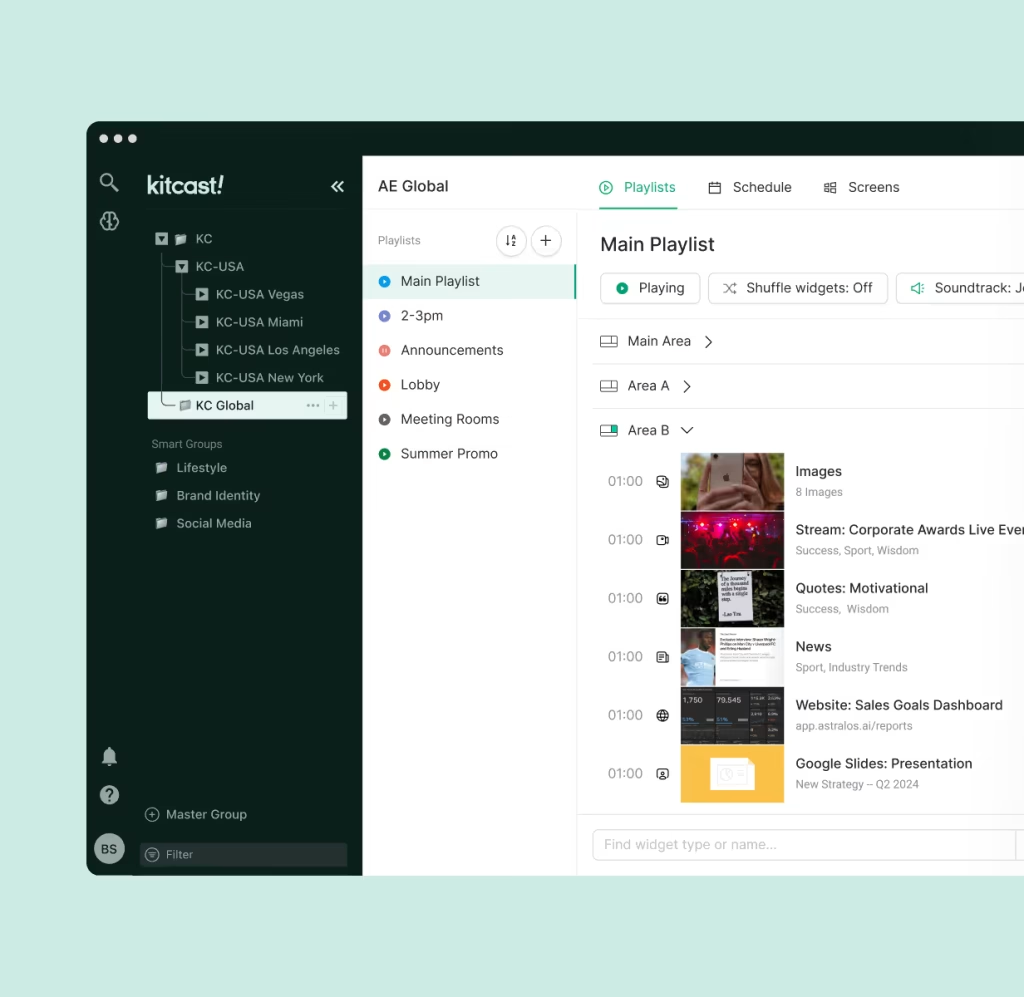
We built Kitcast to solve the exact frustrations operational managers face. We moved away from clunky, crash-prone legacy systems to create something sleek, powerful, and incredibly stable.
Enterprise-Grade Security
Kitcast is built on the Apple ecosystem (using Apple TV as the media player), which is widely recognized as the most secure hardware option in the industry. Combined with our encrypted cloud software, this creates a fortress around your content. Our software also supports Android TV and Amazon Fire TV Stick.
Dynamic Data Integration
Kitcast excels at data. Our platform allows you to link external data sources directly to your screen templates. You don’t need to manually type in flight times. You connect the data feed, design the look, and Kitcast automates the rest.
Centralized Control
From one dashboard, you can see the “heartbeat” of every screen in your airport. You can verify that the screen at Gate 42 is online and playing the correct content. If a screen needs a reboot, you can do it remotely.
Emergency Override
Safety is the priority. Kitcast includes an emergency alert feature that allows authorized staff to instantly override all scheduled content on every screen to display evacuation routes or urgent security messaging.
Check out how we handle dynamic content on the Kitcast Website.
Strategic Use Cases for Airport Screens
Once you have the right software, how do you use it to improve the passenger experience?
1. Intelligent Wayfinding
Getting lost is the #1 stressor for travelers. Static signs are often ignored or become outdated. Digital wayfinding can be dynamic. If Security Checkpoint A is overcrowded, your digital signs can update in real-time to direct passengers to Checkpoint B, which has a shorter wait time. This balances the load and reduces anxiety.
2. The Gate Experience
The gate area is where passengers spend the most “dwell time” (waiting time).
- Before the flight: Show upgrade options, destination weather, and boarding groups.
- During delays: Be transparent. Use the screens to explain why there is a delay. Passengers are much calmer when they feel informed.
3. Revenue Generation
Airports are retail hubs. Digital signage is a powerful tool for driving revenue.
- Duty-Free: Promote luxury goods to international travelers.
- Food & Beverage: Show a steaming cup of coffee on screens in the morning and a cold drink in the afternoon.
- Proof of Play: Advertisers want to know their ads were seen. Kitcast provides detailed reports on exactly when and how often ads were played, making it easier to sell ad space.
For tips on making these ads look great, read our article on Creating Engaging Digital Signage Content.
FAQ: Common Questions About Airport Signage Software
Here are the most frequently asked questions regarding airport display management, answered simply.
1. Can digital signage software integrate with real-time flight data?
Yes. The best software uses APIs to connect directly with your Flight Information Display System (FIDS). This ensures that flight times, gate changes, and delays are updated on screens automatically and instantly without manual input.
2. What happens to the screens if the internet connection is lost?
If you use robust software like Kitcast, nothing bad happens. The software “caches” (saves) the content locally on the media player. The screens will continue to display the scheduled content until the connection is restored, preventing black screens or error messages.
3. Is cloud-based software secure enough for airports?
Yes, provided you choose the right provider. Modern cloud digital signage uses banking-level encryption (SSL/HTTPS) and secure hardware (like Apple TV) to ensure data integrity. In fact, cloud systems are often more secure than on-premise servers because they receive automatic security patches against the latest threats.
4. How difficult is it to manage screens across multiple terminals?
It should be very easy. Top-tier software provides a “Centralized Dashboard.” This allows you to group screens by location (e.g., Terminal A, Food Court) and update them all at once or individually from a single computer, regardless of where the screens are physically located.
5. Can I use digital signage for emergency alerts?
Absolutely. This is a critical feature. Your software should have an “Emergency Override” function that lets you instantly interrupt all playing content to display evacuation routes, fire alarms, or security instructions across the entire network.
Conclusion
The question “What is the best software for managing airport display screens?” comes down to trust.
You need software that you can trust to run 24/7/365. You need software that keeps your data secure. And you need software that makes the complex job of managing a busy airport feel a little bit simpler.
Kitcast provides that stability. It transforms your screens from simple displays into a responsive, intelligent communication network that guides passengers from the curb to the cabin.
Next Step: Are you ready to upgrade your airport’s passenger experience? Start a clear, risk-free trial with Kitcast today and see how easy managing your network can be.


